Popular posts from this blog
Photoshop and Word
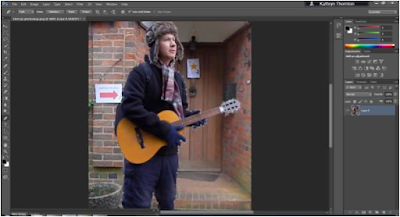
I used photoshop and Word in order to practice how to cut the person out of my picture. Firstly, I used the photo cutting tool in photoshop around my photo. This was very precise, but it took a long time to work out how to use the tool. Here is a screenshot of the process I went through to cut out the photo: I then tried to cut out the photo on Microsoft Word. I found this easier to use than photoshop as all I had to do was colour what parts I wanted to cut out and what parts I wanted to keep. This tools was not as precise as Photoshop as it was very difficult to colour between his fingers and between the guitar. However, if I take more time doing it I could make the photo cut out more precisely. Here is the final result of cutting the photo out on Word. I still think the result on Word is good even though the cut out needs to be more precise.
Message to Moderator
Dear Moderator, My name is Kathryn Thornton, Candidate 1620, and welcome to my OCR A2 Media Studies blog. This is a record of the work undertaken as part of the G325 A2 Advanced Portfolio within the OCR GCS course in Media Studies. I worked independently to produce a short film in the Drama genre. The project lasted six months, commencing in September 2017 and finishing in March 2018. I hope you enjoy my work and find it both successful and interesting. Please use the navigation bar to access my work as organised into labels; Ancillary Tasks, Audience Research, Evaluation, Filming, Preliminary Task, Research and Planing, Short Film, Storyboarding and Trips. There is also a link to the School's blog hub and my other classmates' blogs. Thank you Kathryn Thornton
Comments
Post a Comment